BUILD Launches New Digital Curriculum for Educators

BUILD’s 2021 – 2022 DESIGN QUESTION

“How might we BUILD powerful, thriving communities where EVERYONE enjoys safety, wellness, and economic freedom?”

BREAKING NEWS

Today, BUILD Launches New Digital Curriculum for Educators! BUILD is excited to launch our Thriving Communities Design Challenge for teachers nationwide. BUILD’s Design Challenge is an interactive, FREE virtual curriculum for educators that empowers middle and high school students to solve real challenges in their own communities while learning to use the human-centered design process. Students develop innovative solutions to our 2021-2022 challenge question: “How might we build powerful, thriving communities where everyone enjoys safety, wellness, and economic freedom?” 

Educators, nonprofits and schools, join BUILD’s Thriving Communities Design Challenge – a fun, online experience for students and teachers alike, focused around human-centered design.

BUILD’s Thriving Communities Design Challenge: 

  • Interactive 360° interview experiences, similar to virtual reality for students!

  • Opportunity to practice 21st century skills like problem solving & innovation.

  • Meaningful content from diverse individuals from East to West Coast!

  • Culturally-responsive curriculum, centered in project-based learning.

  • Inspiring resources for students of all backgrounds!
Not An Educator But Want to Help? Spread the Word!

Know an educator, nonprofit or community group that could use

this FREE curriculum for their teachers and/or students?

Share BUILD.org/Virtual to Spread the Word to Educators Nationwide

WHAT TO READ NEXT

BUILD’s Livestream Series June 2026: Boston Alumni Chat

Every month, we showcase the community who make BUILD's programming possible! This time, we'll be joined by Boston-area BUILD Alumni to discuss their experience taking ...
Read more

BUILD’s May/June 2026 Newsletter

Follow along on our monthly highlights from around the country!
Read more

Career Connect: Mock Interview Workshop in California

  On April 21, 2026, BUILD California’s Year 3 students participated in the Career Connect: Mock ...
Read more

From Classroom to Boardroom: Youth Entrepreneurs Take the National Stage

The next generation of American innovators is not waiting for graduation to launch their careers. Starting today, a series of high-stakes, high-energy events will put ...
Read more

Download a Sample of Our Curriculum

Fill out this form to receive a free sample of our curriculum and to receive occasional email updates on how to bring BUILD to your community.

VIDEO PREPARATION GUIDELINES

HOW TO RECORD

1. iPhone, iPad, Zoom and Loom are all choices of recording tools for their video presentation 
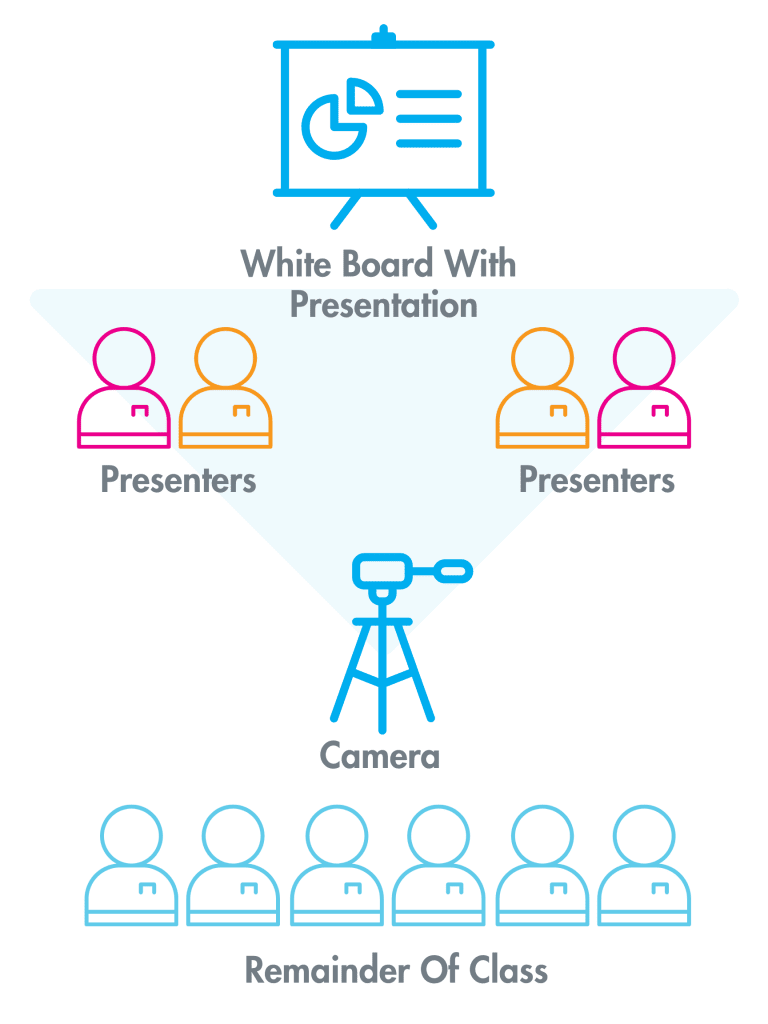
2. Record with both students and their presentation in view
3. Record horizontally for the best view of the students and their presentation
4. Follow Presentation Diagram to the Right

PRESENTATION TIPS.

- Make eye contact with the camera
- Notecards may be used as cue cards
•Pro Tip: Notecards should avoid having a full script
- Even when you are not speaking, don’t forget the camera is still recording!
•Be aware of your body language while you and your business partners are speaking
- Everyone has an opportunity to speak
- Professional dress is encouraged
- Practice makes perfect
•Practice how you will transition from each speaker
•Project your voice when you speak​

A classroom diagram showing a whiteboard at the front, flanked by presenters, a central camera, and the remainder of the class in back.

Follow positioning format Above

Download a Sample of Our Curriculum

Fill out this form to receive a free sample of our curriculum and to receive occasional email updates on how to bring BUILD to your community.