FEATURED ARTICLE

Adobe and BUILD.org Partner to Launch New Curriculum Basics of Branding, FamBiz Expansion Pack for Grades 7–12

BUILD.org and Adobe today announced the launch of BUILD’s FamBiz Expansion Pack: Basics of Branding with Adobe, a new free digital curriculum designed to help educators bring entrepreneurship, creativity, and real-world branding skills into classrooms serving grades 7–12.

  • All
  • Press Releases
  • Giving Tuesday
  • National
  • Teacher
  • Boston
  • California
  • Metro DC
  • NYC
  • PA

From Youth Alumni & Fellows to Published Advisors: How Edgar and Bjourn Helped Chart a New Course for Education

BUILD alumni came full circle at our first Bay Area Alumni Panel at Oakstop in Oakland, returning to share their journeys with 38 students from ...
Read More

Celebrating 5 Years of BUILD Pittsburgh 

Celebrating 5 Years of BUILD Pittsburgh In 2021, BUILD Pittsburgh ...
Read More

Building Brands and Confidence: DC Students Step Into the World of Social Media Marketing at Capital One

BUILD alumni came full circle at our first Bay Area Alumni Panel at Oakstop in Oakland, returning to share their journeys with 38 students from ...
Read More

Bay Area Alumni Return to Inspire the Next Generation of Young Leaders at Aspire Golden State Preparatory Academy

BUILD alumni came full circle at our first Bay Area Alumni Panel at Oakstop in Oakland, returning to share their journeys with 38 students from ...
Read More

BUILD.org Expands Entrepreneurial Curriculum for National Entrepreneurship Week 2026

Fambiz Expansion Pack: Basics in Branding with Adobe To mark ...
Read More

Adobe and BUILD.org Partner to Launch New Curriculum Basics of Branding, FamBiz Expansion Pack for Grades 7–12

Fambiz Expansion Pack: Basics in Branding with Adobe BUILD.org and ...
Read More

Event Recap: BUILD Bay Area’s Hackathon at SVB’s San Francisco office

BUILD Students Tackle Real-World Challenges at Hackathon BUILD students and ...
Read More

Event Recap: BUILD’s 2025 #GivingTuesday Party Livestream

A Night of Impact & Entertainment! Because of your generosity, ...
Read More

Download a Sample of Our Curriculum

Fill out this form to receive a free sample of our curriculum and to receive occasional email updates on how to bring BUILD to your community.

VIDEO PREPARATION GUIDELINES

HOW TO RECORD

1. iPhone, iPad, Zoom and Loom are all choices of recording tools for their video presentation 
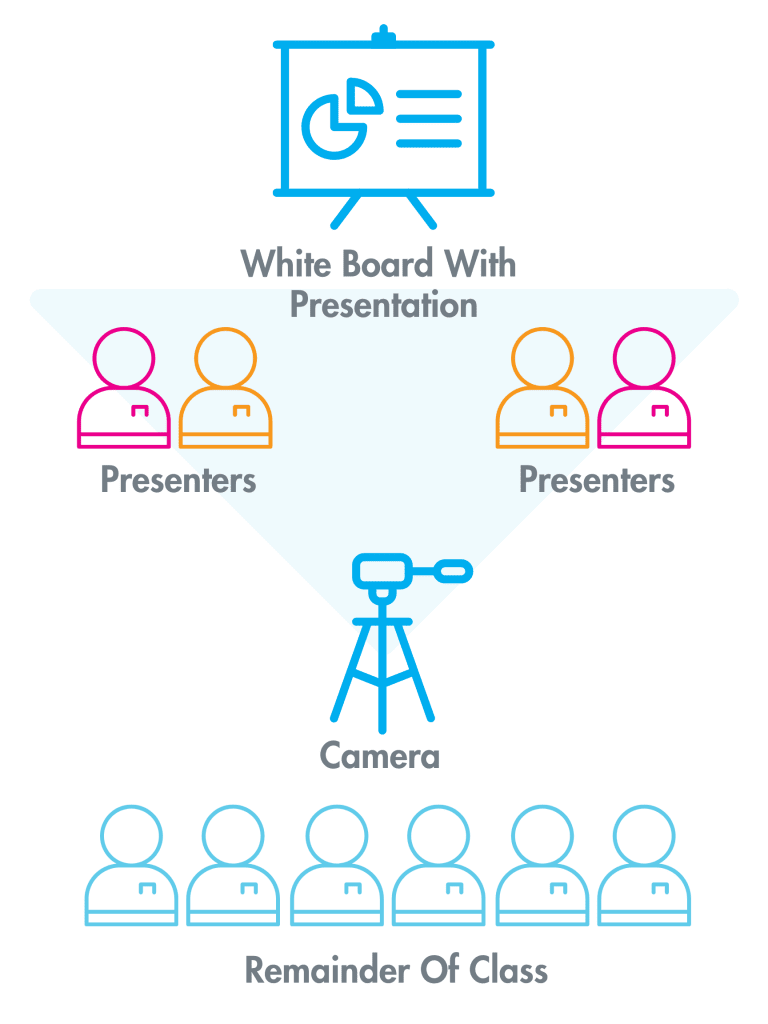
2. Record with both students and their presentation in view
3. Record horizontally for the best view of the students and their presentation
4. Follow Presentation Diagram to the Right

PRESENTATION TIPS.

- Make eye contact with the camera
- Notecards may be used as cue cards
•Pro Tip: Notecards should avoid having a full script
- Even when you are not speaking, don’t forget the camera is still recording!
•Be aware of your body language while you and your business partners are speaking
- Everyone has an opportunity to speak
- Professional dress is encouraged
- Practice makes perfect
•Practice how you will transition from each speaker
•Project your voice when you speak​

Follow positioning format Above

Download a Sample of Our Curriculum

Fill out this form to receive a free sample of our curriculum and to receive occasional email updates on how to bring BUILD to your community.